Set Box Subscription Flow
A complete guide to the new automated subscription management system for Slieve Bloom Organics
Open Public Set Box Page ↗Overview
What's Changed
Going forward, when customers like Niamh Murphy sign up for a Set Box subscription, they automatically enroll on Stripe Recurring billing. This means automatic weekly charges via Stripe, eliminating the need for manual payment links. Alison and the team can monitor all subscriptions directly through the Stripe Dashboard's Subscriptions page.
Customer Self-Service Portal
From their "My Orders" customer portal, subscribers can manage everything themselves:
1. Switch to Auto-Billing
Existing manual payment customers can migrate to automatic recurring billing with one click.
After: Automatic charges, no admin work
2. Manage Subscription
Full control over their subscription lifecycle:
- Pause deliveries & billing
- Skip a specific week
- Cancel anytime
3. Add Extra Items
Shop for additional products each week with free delivery (already covered by Set Box).
✅ Pay via Stripe alongside weekly box
Customer Portal — My Orders Page
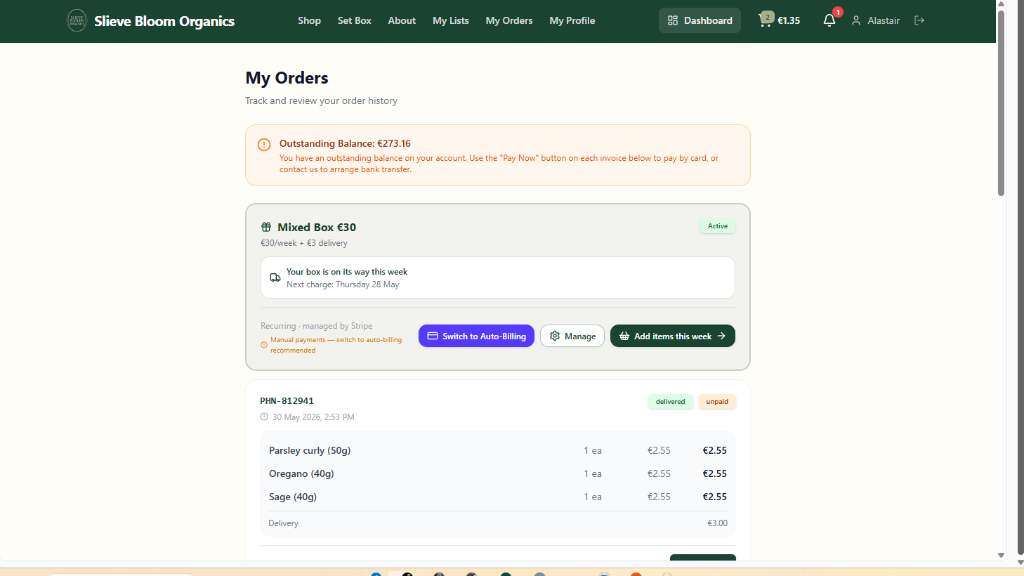
Customers see their active subscription, payment method status, and can take action with clear buttons
Backend Management Dashboard
Alison and the team have complete visibility and control over all subscriptions:
Analytics & Filtering
- Filter by box type (Mixed €20/€30/€40, Farm Only, Custom)
- Filter by delivery day (Monday–Saturday)
- Filter by payment type (Stripe Recurring, Stripe Manual, Cash, Bank Transfer)
- View paused and cancelled subscriptions
Subscriber Management
- Add new subscribers manually
- Edit subscription details
- Pause/resume billing
- Bulk update payment methods
Set Box Admin Dashboard
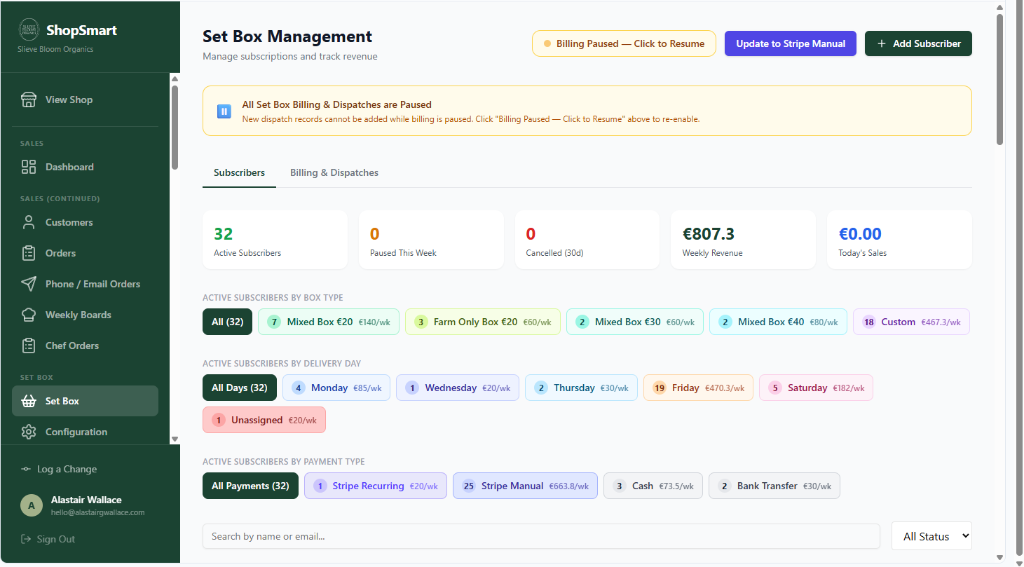
Dashboard shows 32 active subscribers with detailed breakdowns and clickable filters
Order Processing Flow
Streamlined process from subscription to delivery:
Daily Stock Check
The day before delivery, the packing team completes the daily stock check. This determines what Set Box orders need to be registered in the Orders system for the following day.
Order Generation
Set Box orders are automatically generated for all active subscribers scheduled for delivery. These appear in the Orders page just like any other order.
Packing & Dispatch
Sallah and the packing team handle Set Box orders exactly like regular orders — packing slips, dispatch notifications, and delivery routing all work the same way.
Payment Processing
Stripe Recurring customers: Automatically charged — no invoice or payment link sent.
Manual payment customers (Stripe Manual, Cash, Bank Transfer): Receive invoice with payment link via email.
Important: The system automatically detects Stripe Recurring customers and skips duplicate invoice/payment link generation to prevent confusion.
Orders Dashboard
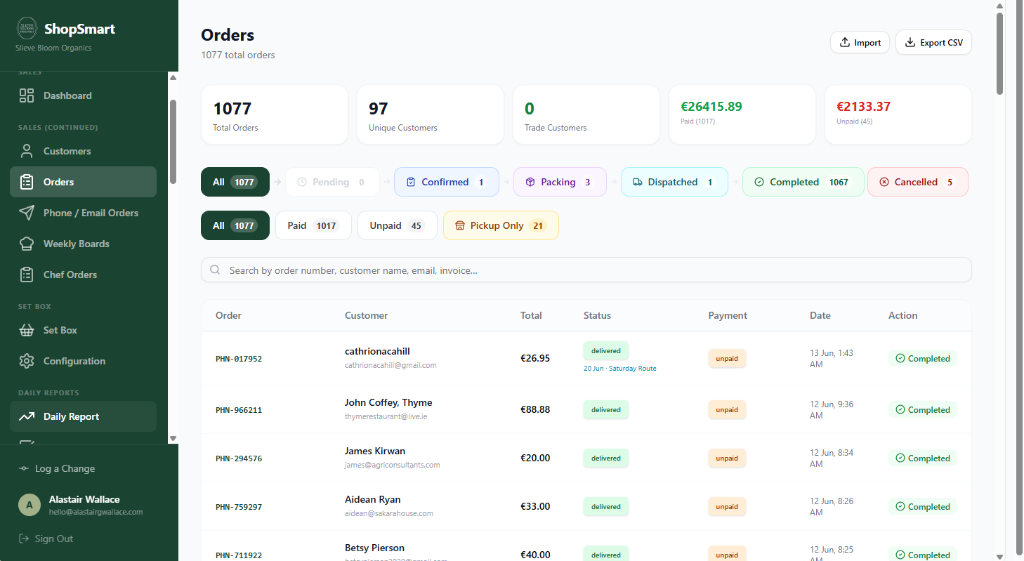
All Set Box orders appear in the Orders page alongside regular customer orders
Stripe Dashboard Integration
Monitor and manage recurring subscriptions directly in Stripe:
Stripe Subscriptions Page
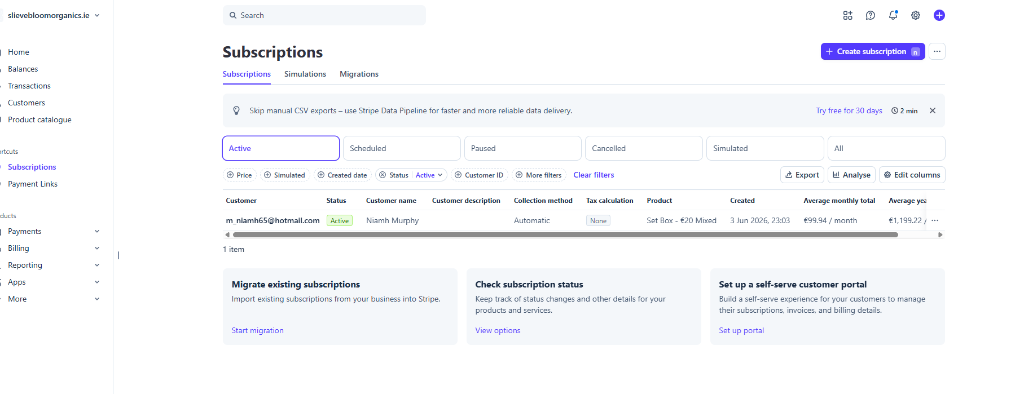
View all active subscriptions, customer details, and recurring billing status in Stripe
Customer Visibility
See customer email, name, and subscription details at a glance
Status Tracking
Monitor active, paused, and cancelled subscriptions
Revenue Insights
Track monthly and yearly recurring revenue per customer
Key Benefits
For Customers
Self-service management, no more manual payment links, complete control over deliveries
For Alison & Team
Automated billing, reduced admin work, complete visibility, no duplicate invoices
For Packing Team
Streamlined workflow, Set Box orders handled like regular orders, clear daily lists
For Cash Flow
Predictable recurring revenue, automatic payments, reduced payment delays
Cookie preferences 🍪
We use cookies to improve your experience. You can choose which cookies you allow.